Woodoku - Wood Block Puzzle
- 4.2
- Rating
- 100.00M
- Installs
- Free
- Price
 Analysis by App-foxy
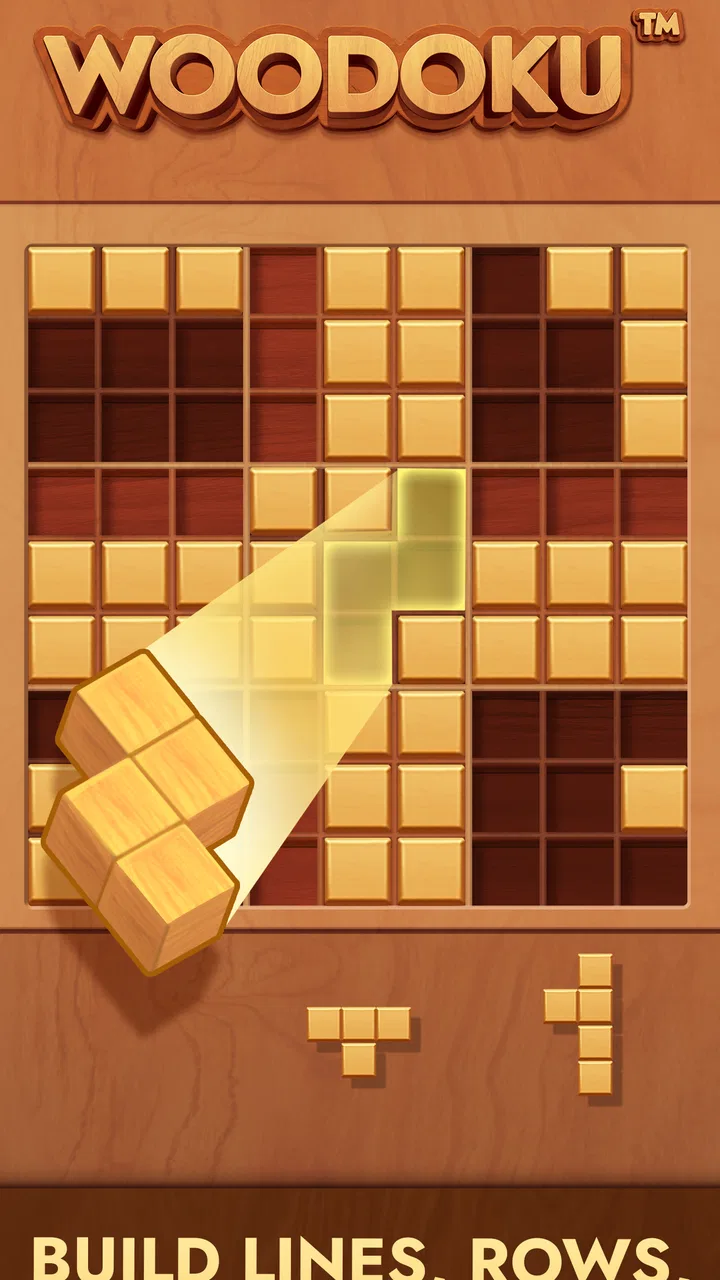
Woodoku is the kind of puzzle game I open when I want something quiet, familiar, and easy to understand without committing to a long session. It combines the placement of wooden blocks with the clearing logic of Sudoku, so the basic idea takes only a moment to learn: fit pieces onto a nine-by-nine board, complete rows, columns, or smaller squares, and keep the board from filling up. The difficulty comes from planning several moves ahead rather than from complicated controls.
Tripledot Studios Limited keeps the presentation deliberately simple. The wooden appearance gives the game a relaxed feel, while the board stays readable on a phone screen. It is a free puzzle game for Everyone, and its broad availability helps explain why it has passed 100 million installs. I found it particularly suitable for short breaks, although a good board can become absorbing enough to turn a few minutes into a much longer session.
Where players usually get stuck
The first obstacle is not learning the rules; it is understanding that every move changes several future possibilities at once. A block that neatly completes a row may also occupy the only useful space for a larger shape. Early mistakes are easy to dismiss because the board still looks open, but the consequences become obvious a few turns later. I had better results when I stopped chasing the quickest clear and started protecting flexible spaces.
You May Also Like

 AccuWeather: Weather Radar
AccuWeather Review: A Quick, Clear Forecast for Everyday Decisions
For everyday plans, the best forecast is the one you can understand quickly. AccuWeather makes rain timing, radar, and local conditions easy to act on, with a few trade-offs.

 Hill Climb Racing
Why Hill Climb Racing Still Turns Crashes Into One More Run
A tiny car, a bumpy hill and one more upgrade: Hill Climb Racing keeps resurfacing because its simple chaos makes every near-miss feel personal.

 AliExpress - Shopping App
AliExpress Makes Global Shopping Feel Personal, but Shoppers Bear the Risk
AliExpress turns a global marketplace into a pocket-sized discovery engine. Its reach is useful, its shopping loop compelling, and its trade-offs easy to miss.

 Lords Mobile: Kingdom Wars
Lords Mobile Is a Kingdom-Building Routine, Not a Quick Match
A case-by-case verdict on the building, battles, device demands, and social commitments that make Lords Mobile rewarding for some players and exhausting for others.

 PDF Scanner app - TapScanner
TapScanner Makes Paperwork Easier to Capture, Check, and Share
TapScanner makes scanning with a phone feel less like a rescue operation and more like a dependable step in getting work done. Its capture tools are useful, though not flawless.

 Block Blast!
 Shows How Much a Puzzle Game Can Leave Out
A quiet grid game shows why puzzle players increasingly value instant clarity, repeatable skill and low-pressure play—and where the genre still needs to catch up.
More From Our News Desk
View All News


New players often place pieces wherever they fit, especially when a shape can complete a line immediately. That approach feels rewarding but can create awkward gaps. A more reliable habit is to inspect all three available pieces before placing any of them. I look for the piece that has the fewest possible locations, place it first, and then reconsider the remaining options. This small change makes the game feel less random and gives each turn a clearer purpose.
The smaller square regions deserve more attention than they initially receive. Completing a row is visually obvious, but filling a three-by-three area can be the move that keeps the center of the board usable. I try not to block the middle with a large shape unless it also contributes to a near-complete line. Corners are often safer storage areas, but they are not automatically good ones; a corner can become a trap when the next pieces need a long uninterrupted edge.
Another common sticking point is the temptation to save an empty area for a piece that may never arrive. Since the available shapes change, holding a perfect-looking gap can be less useful than making a modest clear now. I treat open space as a resource rather than a goal. The best board is not always the emptiest board; it is the board with several different ways to accept the next shape.
This is also where the game differs from a conventional Sudoku app. Traditional Sudoku rewards deduction from fixed numbers, while Woodoku asks me to manage space under changing conditions. If you want a purely logical puzzle with no placement pressure, a standard Sudoku app may suit you better. If you enjoy visual planning and the satisfaction of clearing several areas with one arrangement, this hybrid has more immediate appeal.
A calmer way to plan each turn
I recommend using a quick three-step scan. First, check whether any piece has only one sensible home. Second, identify a row, column, or square that is close to completion. Third, examine what space will remain after the clear. That last step is the one I used to skip, and it caused most of my avoidable failures. A clear that leaves a narrow, fragmented board can be worse than a move that produces no immediate reward but preserves room for larger pieces.
Players who prefer speed may find this cautious rhythm too slow. The game is more enjoyable for me when I treat it as a compact planning exercise rather than a reflex challenge. There is no advantage in tapping quickly if the placement creates a problem that takes several turns to repair. Taking a moment to rotate the possibilities mentally, before committing, is more valuable than trying to maintain a fast pace.
Setup checks before blaming the game
Woodoku is easy to start because the core interaction is straightforward: select a block and place it on the board. Still, the first useful setup check is simply making sure the game has finished loading before judging a delayed response. On an older phone, or after switching between several demanding apps, a short pause can make a tap appear ineffective. I wait for the board to settle, then try one deliberate placement instead of repeatedly tapping the same area.
The game supports devices running Android 6.0 or later, and the current version is 4.13.00. Those details matter when someone is troubleshooting an installation or an update. If the app cannot be installed, closes during startup, or behaves differently after an update, I first check the device’s operating-system compatibility and available storage. These are basic checks, but they eliminate problems that have nothing to do with the puzzle itself.
Screen interaction is another practical source of confusion. Small phones, thick cases, or a finger covering the destination can make a piece look as if it has not been selected correctly. I use a lighter touch near the center of a target area and avoid dragging across the board too quickly. If a placement seems to fail, I try the same move again with the case removed or the screen cleaned, rather than assuming the puzzle has rejected a valid move.
Because the game is free, it is easy to begin without planning around a purchase. It does include optional in-app purchases ranging from $0.99 to $99.99 per item, so I would check the device’s purchase controls before handing the phone to a child. The Everyone age rating makes it approachable for families, but the presence of optional spending is still worth remembering. I prefer to decide in advance whether purchases are part of my experience instead of making that decision during a frustrating board.
There is also a useful distinction between a game problem and a connection problem. If a board is already open and responding normally, I can usually continue focusing on the puzzle rather than repeatedly restarting the app. When something outside the board is not loading correctly, I check the connection, close other apps, and reopen Woodoku once. Repeating the same action over and over rarely improves the situation and can make it harder to tell what actually fixed it.
What to check after an update
After an update, I give myself a few moments to confirm that the board responds as expected before starting a serious run. I check that taps register, the visible pieces can be moved normally, and the game remains stable when I leave and return. If an issue appears only once, I treat it as a temporary hiccup. If it returns consistently, I restart the app and then the phone before changing anything more drastic.
I avoid clearing app storage as a first response because that can affect local game information. A restart is less disruptive and often enough for a minor launch or display problem. If the behavior continues, the sensible next step is to use the normal support route associated with the app and describe exactly what happened: where it occurred, whether it repeats, and whether it began after an update. Clear details are more useful than simply reporting that the game is broken.
These checks are not exciting, but they make the experience less frustrating. Woodoku is built around a simple board, so any interruption feels more noticeable than it would in a complex game with many screens. I have found that separating a technical delay from a bad strategic move keeps me from abandoning a puzzle unnecessarily.
Recovering a run after a poor move
When I place a block badly, my first instinct is to restart mentally and search for a perfect recovery. That usually wastes more attention than it saves. Instead, I examine the board for the most constrained area. If one row needs only a small piece, I protect it; if a square is nearly full, I avoid filling its remaining spaces with shapes that cannot contribute to a clear. Recovery is about restoring options, not recreating the position I wanted.
A practical recovery technique is to stop building tall walls. Large vertical or horizontal stacks may look organized, but they reduce the number of places available for irregular pieces. I use the next few turns to create broader open regions, even if that means delaying a line clear. Once the board has breathing room, the available pieces become easier to evaluate.
I also avoid treating every near-complete line as urgent. A row with one empty space can be valuable, but completing it with the wrong shape may split the remaining board into disconnected pockets. Before filling it, I ask whether the cleared cells will actually create a useful landing area. This is one of the more subtle trade-offs in the game: a visible reward can still produce a strategically weak position.
When a run is clearly beyond recovery, restarting can be reasonable, but I try to identify why it failed before doing so. Was I placing the first convenient piece? Did I reserve too much space for a shape that never appeared? Did I ignore the three-by-three regions? Naming the mistake gives the next attempt a purpose. Otherwise, restarting simply repeats the same pattern with a different board.
The game works well in everyday situations where attention comes in short bursts. I might play while waiting for an appointment or during a short break, then put the phone away after one or two turns. That makes the absence of a complicated story a strength: I can pause without forgetting characters, objectives, or a sequence of events. On the other hand, anyone looking for a deep campaign, competitive teamwork, or a strong narrative will find the experience intentionally limited.
How it compares with familiar puzzle alternatives
Compared with classic block-dropping games, Woodoku gives me more time to consider each placement. The challenge is spatial planning rather than reacting to pieces falling at speed. That makes it friendlier for relaxed play, but less exciting for someone who enjoys pressure, rapid decisions, and escalating action.
Compared with ordinary Sudoku, it is more tactile and less dependent on fixed numerical deduction. I can understand a move by looking at shapes and open spaces rather than scanning a grid of clues. The trade-off is that a poor placement can feel more like a planning error than a logical contradiction. Players who want a clean answer that follows from clues may prefer Sudoku; players who like arranging objects and managing room may prefer this game.
Compared with match-three puzzles, Woodoku is less about creating chains and more about preserving the board. There is no need to search for a colorful combination every second. I enjoy that slower mental pace, especially when I want a game that does not demand constant visual stimulation. However, the quieter presentation may feel plain beside games built around effects, characters, and frequent rewards.
The free entry point is convenient, but optional purchases mean that the experience is not identical to a completely purchase-free puzzle. I would recommend it to someone comfortable ignoring optional spending and to families willing to review purchase settings. I would be more cautious recommending it to a person specifically seeking a minimal app with no commercial prompts at all.
When the app is not the cause
Sometimes the real issue is the device rather than the game. A nearly full phone, an overloaded background process, an aging battery, or an unreliable touch screen can all make a simple puzzle feel unstable. If other apps also hesitate, fail to register taps, or close unexpectedly, I would investigate the phone first. Testing Woodoku after closing unused apps is a quick way to separate a general device problem from a game-specific one.
Network conditions can also confuse the diagnosis. A weak connection may affect loading or other connected parts of an app, but it does not change the basic strategic lesson of a board that has been played badly. I do not repeatedly reinstall a game just because one screen takes longer than expected. I try a stable connection, reopen the app once, and observe whether the same problem appears again.
Storage is another overlooked factor. Even when a game itself is not large, a phone with very little free space can behave unpredictably during updates or temporary file creation. Checking storage before an update is a sensible precaution. I also keep the operating system current when the device supports it, since compatibility issues can come from the wider phone environment rather than from the puzzle’s rules or interface.
Touch accuracy deserves a simple test. If a piece consistently fails to land in one area but works elsewhere, I inspect that part of the screen and try without a case or screen protector. If every app shows the same behavior, Woodoku is probably only revealing an existing hardware issue. This distinction matters because changing game settings will not repair a damaged or obstructed touch area.
Finally, expectations can create a false impression of malfunction. The game may reject a placement because the block does not fit, not because the control failed. I slow down, look at the shape’s full outline, and confirm that every occupied cell has an open destination. A quick tap on a nearly filled region can make a valid rule look like a technical fault.
Who will enjoy it most
I think Woodoku is a strong match for people who like quiet, repeatable puzzles with no learning curve after the first board. It suits commuters, casual players, and anyone who wants a short mental reset without audio, story, or fast reactions being central to the experience. The Everyone rating also makes it approachable for shared family use, provided adults remember the optional purchase settings.
It is less suitable for players who need a sense of progression beyond improving their own decisions. If you want a campaign with new characters, a competitive ranking focus, or a puzzle with one provably correct solution, another category may serve you better. The same applies if you dislike replaying similar board-based sessions or if you find careful spatial planning more tiring than relaxing.
The game’s appeal depends heavily on your preferred rhythm. I enjoy the moment-to-moment decisions, but I would not describe it as a complete substitute for a dedicated Sudoku application or a high-energy arcade game. It occupies a middle ground: more tactile than number puzzles, calmer than action-oriented block games, and more demanding than a purely casual matching activity.
My practical verdict after playing
Woodoku succeeds because its rules are immediately approachable while its best decisions are not. I can begin with no tutorial burden, yet still improve by learning to preserve flexible spaces, inspect all available pieces, and plan beyond the next clear. Those lessons give the game more depth than its plain wooden board first suggests.
The main friction is strategic rather than technical. Poor placement can quietly ruin a run, and the game offers no way to undo that choice, so patience matters. On the technical side, basic checks around the operating system, storage, touch response, and restarting the app cover most sensible first steps without risking unnecessary changes to local information.
Tripledot Studios Limited has made a free puzzle that is easy to recommend when you want a calm five-minute activity and are comfortable with optional purchases. Its 4.1 average from around 464 thousand ratings shows broad player interest, while roughly 42 thousand written reviews add to its visible public history. I would not choose it for narrative depth or intense competition, but for thoughtful block placement in short sessions, it earns a place on my phone.
My bottom line: choose Woodoku if you enjoy arranging space, thinking one or two moves ahead, and improving through practice. Skip it if you want fast action, fixed-clue deduction, or a completely distraction-free puzzle environment. For everyone else, it is a polished, accessible way to turn a spare moment into a small but genuinely engaging logic challenge.
FAQs for Woodoku - Wood Block Puzzle
01What is the main objective of Woodoku?
Woodoku combines elements of Sudoku and block puzzles. The main objective is to strategically place wood blocks on a 9x9 grid to create complete lines or 3x3 squares, which are then cleared from the board. It’s a game of strategy and planning, requiring players to think several moves ahead to maximize their score.
02Is Woodoku free to play, or are there in-app purchases?
Woodoku is free to download and play, offering a substantial amount of content at no cost. However, the game includes optional in-app purchases for players who wish to enhance their experience or remove ads. These purchases are not necessary to enjoy the full game but can provide additional convenience.
03Can I play Woodoku offline?
Yes, Woodoku can be played offline, making it a great choice for users who may not always have access to the internet. This feature allows you to enjoy the game anywhere, whether you’re commuting or just want to unplug for a while. Progress is saved locally and updates when you reconnect.
04Does Woodoku offer any hints or help if I get stuck?
Woodoku does not offer traditional hints, as the challenge lies in planning your moves. However, the lack of a time limit allows players to think carefully about each placement. Players are encouraged to experiment and learn from each game, which enhances strategic thinking over time.
05What age group is Woodoku suitable for?
Woodoku is suitable for all ages, offering a simple yet challenging gameplay experience that can appeal to anyone from children to adults. Its user-friendly interface and lack of mature content make it an excellent choice for family-friendly entertainment, providing a fun way to develop problem-solving skills.
Pros
- Simple and intuitive interface.
- No internet connection required.
- Visually relaxing design.
- Challenging yet rewarding gameplay.
- Quick sessions fit busy schedules.
Cons
- Ads can be frequent and disruptive.
- Limited in-game tutorials.
- No multiplayer features.
- Can become repetitive over time.
- Some levels feel too easy.

Woodoku - Wood Block Puzzle
Gallery